
Accessing Legacy RS232 and RS485 Equipment Over Ethernet Without Touching SCADA

Quick Answer
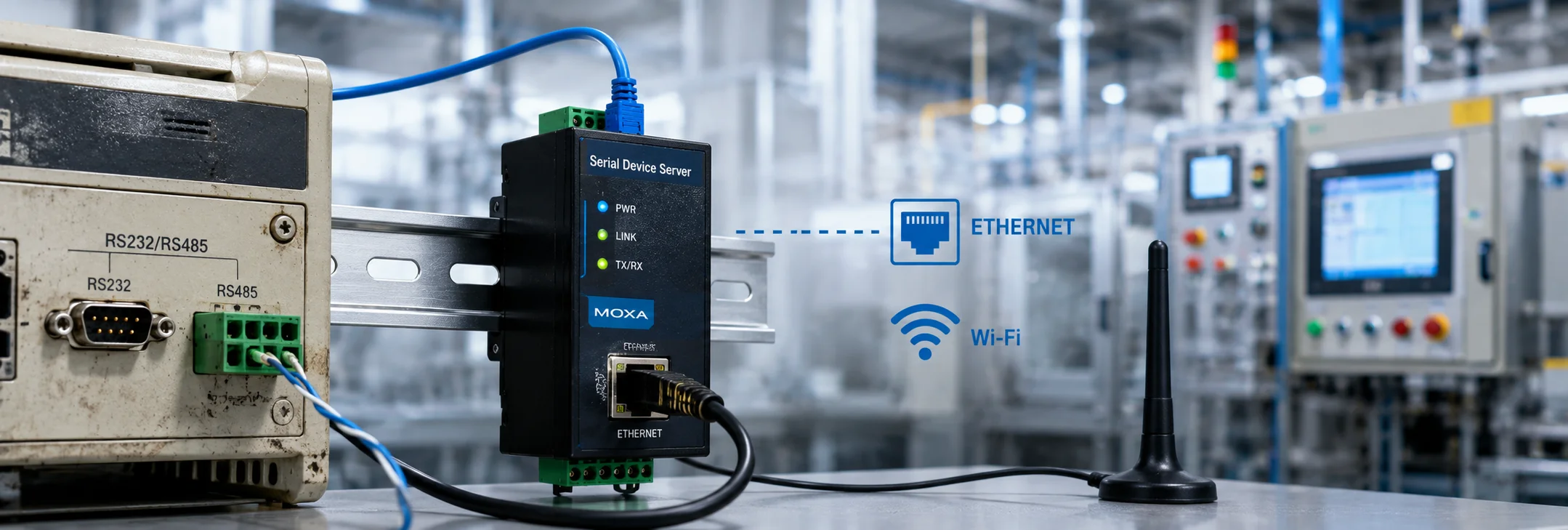
Reaching a legacy RS232 or RS485 device over Ethernet or WiFi does not have to mean touching validated SCADA logic. This field guide compares serial device servers, Modbus gateways, industrial WiFi bridges, and protocol converters as virtual COM port solutions, and covers the termination, RF survey, and sourcing details that decide whether a gateway swap goes cleanly or turns into a callback.
The Problem With Perfectly Good Serial Equipment
A VFD panel from 2009 does not care what year it is. Neither does the RS485 motor starter feeding a bottling line, nor the RS232 weigh scale bolted to a hopper that has never once caused trouble. The equipment is not the problem. The problem is everything that has grown up around it over the years: conduit runs that no longer match the plant layout, SCADA software that was validated a long time ago and cannot be touched without a change order, and a maintenance team that would far rather keep a working driver than gamble on a rewrite.
That is where the real question begins. How do you reach legacy RS232 or RS485 equipment over Ethernet or WiFi without changing the SCADA software that talks to it? The question rarely comes from curiosity about new protocols. It comes from a work order stating that a device now needs to reach a control room three buildings away, and nobody wants to open the HMI project file to make that happen.
The Short Answer Before the Detail
The short answer is a serial to Ethernet or serial to WiFi gateway configured as a virtual COM port. That single piece of hardware lets the SCADA, HMI, or PLC programming software keep talking to exactly the same driver it always has, while the physical link quietly moves from a copper serial cable to a network segment. There is no retagging, no new driver license, and no need to touch validated logic. The rest of this article explains why that works, which of four gateway approaches fits which situation, and where the approach hides its one real caveat.
A Quick Primer on RS232 and RS485
It helps to be precise about what these two older standards are, because the right gateway depends on which one is in front of you. RS232 is a point to point standard. One transmitter, one receiver, a short cable, and a hard limit on distance that is easy to violate without noticing. It is what you find on a weigh scale, a barcode verifier, or the programming port of an older PLC. RS485, by contrast, is a multidrop standard. It runs several devices on a single twisted pair, each with its own address, and it tolerates far longer cable runs. Motor starters, relay logic panels, and small distributed PLC networks tend to live on RS485.
The distinction matters because a single device on RS232 and a bus full of devices on RS485 call for different gateways, even though both problems can look identical from the control room. Getting this one fact straight at the start saves ordering the wrong hardware, which is the most expensive mistake available in a project this simple.
Why the Physical Layer Is the Only Thing That Should Change
Every SCADA package, whether it is a legacy Wonderware panel, an aging RSLogix project, or a newer Ignition install still talking to old iron, reaches a device through a communication driver that is bound to a port. Historically that port has been a physical COM port wired to RS232 or RS485. The important detail is that the driver does not know, and does not care, whether the COM port behind it is real or virtual.
How a Virtual COM Port Looks to the Driver
A serial device server exploits exactly that indifference. It sits at the field device end, terminates the RS232 or RS485 wiring, and presents itself to the network as an Ethernet or WiFi endpoint. Back on the SCADA side, a small redirector service creates a virtual COM port that looks, to both the operating system and the SCADA driver, identical to a physical one. If the software never sees a difference, then there is nothing left in the SCADA configuration to change. That is the whole value proposition stated plainly.
If the software never sees a difference, there is nothing in the SCADA configuration left to change. That is the entire value proposition.
The Change Control Angle Procurement Underestimates
This matters for a reason procurement teams routinely underestimate, which is change control. In a validated or regulated environment, modifying SCADA logic can trigger a full revalidation cycle, with all the cost and schedule delay that implies. Swapping the transport layer underneath an unchanged driver usually does not, because nothing in the tag database or the project file has moved. The device is reached the same way it always was. Only the wire behind it is different, and the wire is not the thing that gets validated.
Serial Device Servers: The Default Answer for One Device, One Link
For a single RS232 device such as a weigh scale, a barcode verifier, or a legacy PLC programming port, a single port serial device server is usually the fastest fix available. Units from manufacturers such as Moxa, Advantech, and Lantronix handle this cleanly and have done so for close to two decades, which means the hardware is mature and its failure modes are well understood.
Configuration looks simple on paper. Set the baud rate, parity, and stop bits to match the device, assign a static IP or reserve a DHCP lease, and install the vendor virtual COM port driver on the SCADA machine. In practice, the failure point is almost always a mismatched serial parameter buried in an old commissioning document rather than anything on the network side. When a fresh install refuses to communicate, the serial settings are the first place to look, not the Ethernet.
A Realistic Field Scenario
Picture a packaging line with an RS232 connected checkweigher fifteen meters from the nearest network drop but ninety meters from the control room where SCADA runs. Running new serial cable across that distance risks noise pickup and violates the RS232 length limitation outright. Pulling Cat6 to a nearby switch and dropping a serial device server at the checkweigher solves the distance problem without an engineering change request against the SCADA project.
Downtime cost drove that decision, not elegance. The line loses roughly four thousand dollars for every hour it is down. A weekend install of a device server costs a small fraction of that, while a SCADA driver swap would have required scheduled downtime, a formal change window, and sign off from a validation engineer. The gateway was simply the cheaper path measured in the currency that actually mattered, which was production hours.
Modbus Gateways for RS485 Networks With Multiple Slaves
RS485 rarely means a single device. Motor starters, relay logic panels, and multidrop PLC networks typically share one twisted pair as a bus, with several slave addresses living on it at once. Here a Modbus RTU to Modbus TCP gateway does more work than a simple serial server. It terminates the entire RS485 segment and republishes every slave address onto the Ethernet side as Modbus TCP unit IDs.
SCADA software that already speaks Modbus TCP for other devices needs no new driver at all. It needs only a new IP target and a unit ID mapping added to the Modbus TCP driver instance it already runs. This is close to the cleanest possible outcome: the same driver, the same tag structure, and a different transport underneath. Nothing about the way an operator reads the data changes.
For more on how these protocol and driver choices affect plant-wide efficiency, see our guide on how PLC and SCADA systems improve efficiency in industrial automation.
Watch Termination and Biasing on the RS485 Side
There is one physical detail that catches people out. When a gateway replaces an existing master on an RS485 bus, termination and biasing need attention. Some gateways provide bus termination and bias resistors internally, while others expect the field wiring to already supply them. Skipping this check is the single most common cause of intermittent slave dropouts after a gateway swap, and it is a nasty one to diagnose because it presents as a software problem when it is really a physical layer issue. A bus that worked yesterday and drops slaves at random today, right after a gateway change, is almost always a termination question.
When WiFi Makes More Sense Than a Wired Gateway
Wired Ethernet is the more deterministic choice and should be the default whenever it is possible. But it carries an assumption that is not always true, which is that you can actually run the cable. Mobile equipment skids, rotating turntables, equipment sealed inside process vessels during maintenance windows, and facilities where a conduit run would have to cross a fire rated wall all change that calculation.
Industrial WiFi serial bridges solve the same virtual COM port problem without new cable, but they add a variable that wired networking does not have, which is the RF environment. Metal enclosures, motor noise, and overlapping 2.4 GHz traffic from consumer devices on the same plant floor all degrade a serial over WiFi link, and they do it in a way that surfaces as dropped characters or communication timeouts at the SCADA driver rather than as an obvious network fault.
Run an RF Survey Before You Buy
A short site RF survey before committing to hardware saves a return trip and a frustrating week of blame shifting between the network and the device. Industrial grade access points with dedicated channels and proper antenna placement outperform consumer mesh systems by a wide margin in a plant environment, and the price difference between the two reflects that gap in capability rather than mere branding. Money spent on the survey and the right access point is far cheaper than commissioning a link twice.
Custom Protocol Converters for Non Modbus Legacy Devices
Not every legacy device speaks a standard protocol. Some older equipment uses proprietary ASCII strings, custom checksums, or vendor specific framing that predates the arrival of Modbus on the shop floor. A generic serial device server still works at the physical layer for these devices, but the SCADA driver may need a custom tag parser if the existing driver was written specifically around the serial byte stream rather than around a protocol standard.
The One Real Caveat to Zero SCADA Changes
This is the single category where the promise of zero SCADA changes carries a genuine caveat, and it is worth stating clearly. If the current driver parses raw serial bytes directly rather than a defined protocol, then moving that stream over Ethernet is trivial and nothing changes. But any protocol translation performed at the gateway level risks breaking the byte for byte match the driver expects. The safe practice in these cases is to keep the gateway in transparent pass through mode rather than protocol conversion mode, so the byte stream the driver sees is exactly the one it always saw.
Comparing the Four Approaches
The table below lines up the four methods against the questions a project engineer actually weighs.
| Method | Best Fit | SCADA Impact | Typical Cost and Lead Time |
|---|---|---|---|
| Serial Device Server (port redirector) | A single device whose driver expects a COM port | None. A virtual COM port replaces the physical one. | Low cost, in stock at most distributors |
| Modbus TCP and RTU Gateway | Several RTU slaves onto one Ethernet segment | None if SCADA already polls Modbus TCP | Moderate cost, one to two week lead time typical |
| Industrial WiFi Serial Bridge | Mobile skids, rotating equipment, or no route for conduit | None. It appears as a virtual COM port over the WLAN. | Higher cost, verify the site RF survey first |
| Protocol Converter With Custom Driver | Proprietary ASCII protocols with no Modbus map | Possible tag remapping required | Highest cost, engineering time adds lead time |
What the table makes clear is that none of these four approaches requires touching validated SCADA logic. The decision is almost entirely about the field side. How many devices share a bus, how far the signal needs to travel, and whether cable is physically possible are the three questions that select the method. The SCADA room, in every case but the custom protocol exception, stays exactly as it was.
Common Mistakes That Turn a Simple Swap Into a Callback
Most gateway projects that go wrong go wrong for a small number of repeatable reasons. Naming them plainly is usually enough to prevent them:
- Assuming a communication failure is a network problem when the serial parameters, meaning baud rate, parity, or stop bits, quietly fail to match the device.
- Replacing an RS485 master without checking whether the new gateway supplies termination and bias, then chasing random slave dropouts as though they were a software fault.
- Choosing a WiFi bridge without an RF survey, then discovering motor noise and 2.4 GHz congestion only after the link is already in service.
- Putting a gateway into protocol conversion mode on a device whose driver expects a raw byte stream, and breaking a match that transparent pass through would have preserved.
- Ordering on price from an unknown marketplace seller and receiving a counterfeit unit that fails certification or ships with vulnerable firmware.
Every one of these is far cheaper to prevent at the specification stage than to diagnose on a callback with the line stopped.
Sourcing Considerations Before You Order Hardware
Serial device servers and Modbus gateways are close to commodity items, but they are not identical across brands, and the differences hide in the details. Cross reference the exact model against the current datasheet before ordering, because manufacturers revise firmware and hardware revisions under the same part number more often than procurement teams expect. The unit that worked on the last project may not behave identically to the one that ships this time under the same number.
Buy Through an Authorized Distributor
Buy through an authorized distributor rather than a general marketplace. Gray market serial gateways have a documented history of counterfeit units built with substituted components that fail RF certification or run outdated firmware with known vulnerabilities. A ten percent saving on the purchase price is not worth a failed commissioning date or a security exposure sitting on the plant network. The verification is quick, and it is the cheapest insurance in the entire project.
Plan for Lead Time
Lead time planning matters more than it used to. Single port serial device servers are usually stocked and ship within the same week. Multiport Modbus gateways and ruggedized WiFi bridges rated for extended temperature ranges often carry two to four week lead times, and longer during regional component shortages. Build that into the project schedule from the start rather than discovering it after the change request has already been approved and a commissioning date promised.
Reliability and Maintenance After the Gateway Is Installed
A gateway is one more component with its own mean time between failures, and it deserves the same predictive maintenance attention as the field device it connects. The most useful early warning is creeping latency in polling response times, which often precedes an outright communication failure by weeks. A gateway whose response times are slowly climbing is telling you something, and catching that trend turns an emergency into a scheduled replacement.
Redundancy and Spares
For redundancy planning, dual Ethernet gateways with automatic failover exist for exactly this purpose, and they earn their incremental cost on any line where the acceptable downtime threshold is measured in minutes rather than hours. On lower criticality auxiliary equipment, a single gateway with a cold spare on the shelf is usually enough. The point worth remembering is that a gateway which has run clean for three years is not proof it will run clean for a fourth. It is a panel component with a service life, and it should be treated like one.
A Short Checklist Before You Commit
A few questions, answered honestly before any hardware is ordered, will settle the method and surface the field work that comes with it:
- Is this one device or a bus of several, and if a bus, is it Modbus or a proprietary protocol?
- How far does the signal need to travel, and is running cable physically possible along that path?
- Does the existing SCADA driver expect a COM port, already speak Modbus TCP, or parse a raw byte stream?
- If WiFi is on the table, has anyone surveyed the RF environment at the actual device location?
- Does the RS485 bus already have termination and bias, or must the gateway supply them?
- What is the acceptable downtime for this line, and does that justify a redundant gateway or a cold spare?
Answer those, and the choice among the four methods usually makes itself.
Getting This Right the First Time
The pattern across all four methods is the same. The SCADA software keeps its existing driver, its existing tag database, and its existing validation status. Only the physical transport between the device and the network changes. That is exactly what makes this approach viable in plants where a change request against SCADA logic is expensive, slow, or simply not on the table this quarter.
Techno Control Corp sources and specifies serial device servers, Modbus gateways, and industrial wireless bridges against your exact device list and SCADA driver requirements, and can confirm compatibility before any hardware ships. If you are planning a legacy equipment integration and want a second set of eyes on the bill of materials before you commit to a purchase order, reach out to our sourcing team with your device list and network layout.
Related products
Components from our catalogue relevant to this article — request a quote for availability, lead time and pricing.
/TC625 AF100 ABB - Coaxial Modem 3BSE002224R1.png "ABB TC625 AF100 ABB - Coaxial Modem 3BSE002224R1 | Coaxial modem TC625 AF100")
TC625 AF100 ABB - Coaxial Modem 3BSE002224R1
Coaxial modem TC625 AF100
/SB512 ABB - Power Supply 3BSE002098R1.png "ABB SB512 ABB - Power Supply 3BSE002098R1 | SB512 power supply module")
SB512 ABB - Power Supply 3BSE002098R1
SB512 power supply module
/DSSS 171 ABB - Voting Unit 3BSE005003R1.png "ABB DSSS 171 ABB - Voting Unit 3BSE005003R1 | DSSS 171 voting unit for safety systems")
DSSS 171 ABB - Voting Unit 3BSE005003R1
DSSS 171 voting unit for safety systems
/4NWP100174R0001 ABB - UPS PowerValue 11LI Up 2000 VA.webp "ABB 4NWP100174R0001 ABB - UPS PowerValue 11LI Up 2000 VA | UPS PowerValue 11LI Up 2000 VA")
4NWP100174R0001 ABB - UPS PowerValue 11LI Up 2000 VA
UPS PowerValue 11LI Up 2000 VA